


The all-in-one tool to move a Final Cut Pro X Event or Project to:
Premiere Pro,
After Effects,
Audition,
and beyond!
XtoCC
XtoCC (also called Project X₂7) translates Final Cut Pro X Library XML (fcpxml) and converts it for import into Adobe's Creative Cloud apps - Premiere Pro, Audition & After Effects - or other compatible applications.
(If you need translation the other way — from Final Cut Pro 7 to Final Cut Pro X — there's an app for that too!)
Your Final Cut Pro XML is ready for:
- Premiere Pro, and then to
- AAF to Avid Media Composer and Pro Tools
- OMF for ProTools
- EDL
- After Effects
- Audition
- Final Cut Pro 7
- other Final Cut Pro 7 XML workflow tools.
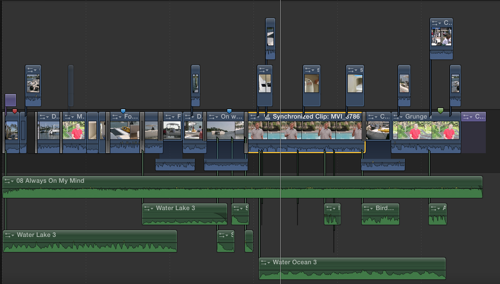
A typical Final Cut Pro X Project with:
- titles at the start and end;
- a mixture of primary storyline and connected clips;
- a mix of active and inactive clips;
- large numbers of J and L cuts;
- to-do markers and regular markers;
- spot audio effects; and
- cross-dissolve transitions.
All transfer without problem. Unfinished to-do markers appear as red markers, completed to-do markers as Green markers, and the blue Final Cut Pro X markers as blue markers in Final Cut Pro 7.
Check the Help Documentation for an up-to-date list of what translates and what doesn't translate.
Requirements:
- Final Cut Pro version 10.0.1 or later
- An application that imports Final Cut Pro 6/7 XML (such as Premiere Pro CC, After Effects CC, Audition CC, DaVinci Resolve, Color, Final Cut Pro 6 or 7 etc.)
- OS X 10.11 El Capitan or 10.10 Yosemite or 10.9 Mavericks or 10.8 Mountain Lion or 10.7 Lion or 10.6 Snow Leopard

Shop
Online | Assisted Editing | Support | Press
About Us | Contact Us | Other Smart Tools