


Make Adobe speech transcriptions more useful!
Transcriptize
Take transcriptions from Adobe Soundbooth CS4 or CS5 to Media Composer, Excel and Final Cut Pro!
Adobe has added speech transcription to Soundbooth and Premiere Pro, which has many applications within the Production Premium workflow, particularly exporting to Flash. But it hasn’t been that useful to producers or editors on other platforms.
Introducing Transcriptize! Now there are more uses than ever for speech transcription exports from Soundbooth.
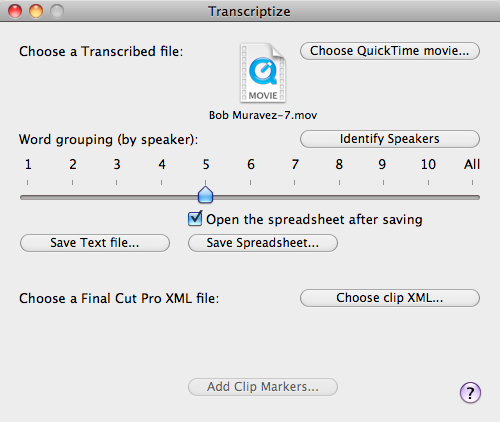
With Transcriptize you can:
- Name the speakers (something not possible in Soundbooth);
- Export a plain text file, suitable for the needs of a producer or to import into Media Composer’s ScriptSync engine;
- Export an Excel spreadsheet with a variable number of words per row. Perfect for a producer’s needs.
- Optionally open the XML from a Final Cut Pro clip and add the transcription to Markers where:
- there are a variable number of words per Marker (including one Marker per speaker);
- the speaker name is placed in the Marker name;
- Transcription appears in the clip Marker comment;
- Marker colors are used to identify each speaker (FCP 7);
- the transcription can be searched within Final Cut Pro to find where in a clip the text occurs;
- Markers can be easily subclipped based on transcription content.
Requirements:
- Adobe Premiere Pro CS4 or later
- Optionally Final Cut Pro 6 or 7 (part of Final Cut Studio)
- An Intel Mac running OS X v10.10 Yosemite or v10.9 Mavericks or v10.8 Mountain Lion or v10.7 Lion or v10.6 Snow Leopard
Shop
Online | Assisted Editing | Support | Press
About Us | Contact Us | Other Smart Tools