


DVCPRO HD, XDCAM, AVC-I, AVCAM and RED files, as well as DSLR TIFF and JPEG images, all carry important metadata, but it's no use to you because you can't see it in Final Cut Pro. Unless you use Metadata Explorer to reveal that hidden metadata for you to use.
The demo version is a useful free tool that gets an extra trick when you buy a serial number.
 See for yourself: download a demo version (saves to
Excel only)
See for yourself: download a demo version (saves to
Excel only)
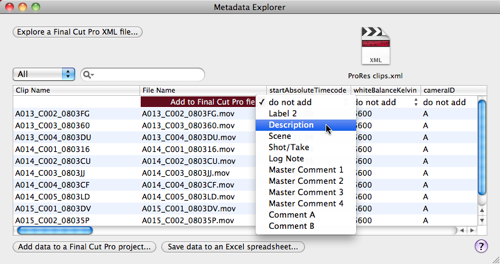
Metadata Explorer lets you view the hidden QuickTime and Exif metadata in your Final Cut Pro project that aren't shown in the Browser window.
Depending on your camera's format the metadata available might include: date, time, location, camera ID, reel ID, white balance temperature, saturation, memo...
The demo version lets you view and export the QuickTime and Exif metadata columns to an Excel spreadsheet, while the paid version also lets you add the hidden metadata to visible logging fields inside your Final Cut Pro project.
Metadata Explorer is available now for US$69. Requirements: