 “Very
cool, very cheap, very necessary. I couldn't imagine editing in Final
Cut Pro X without it.”
“Very
cool, very cheap, very necessary. I couldn't imagine editing in Final
Cut Pro X without it.”
Event Manager X — free but obsolete!
Event Manager X was replaced by FCP X 10.1's Libraries. If you want a Library Manager for Final Cut Pro X 10.1 or later, we recommend Artic Whiteness' Final Cut Library Manager.
For Final Cut Pro 10.1, Event Manager X can help you control the upgrade of your Events and Projects to the new Libraries — here's how.
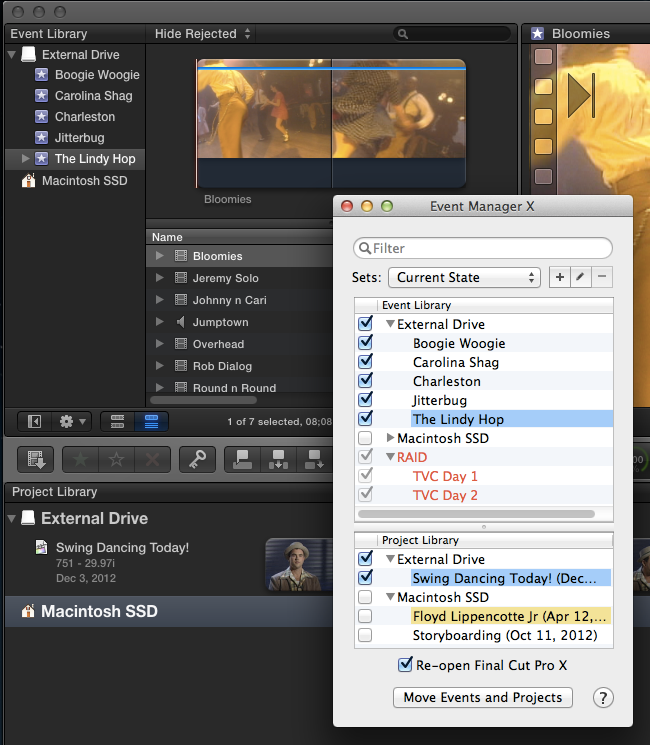
For Final Cut Pro 10.0.9 and earlier, Event Manager X gives you control over your Events and Projects so you can manage what you want to be visible in Final Cut Pro X’s Event Library and Project Library. It allows you to create Sets: combinations of related Events and Projects for instant reload. It also tracks Events and Projects that are on offline storage devices, so you can properly ensure all relevant Events and Projects are mounted.
By default Final Cut Pro X 10.0.9 and earlier, will show you all Events and Projects on all mounted storage devices. Apple offer a manual answer in their support document Final Cut Pro X: Hiding Events in the Event Library, but there is no way to keep track of Events or Projects not visible or on unmounted storage devices, nor any way to quickly bring up a combination of Events and Projects that match a particular job, or are related to the one client.
Event Manager X does all this and much more. You see the full state of the mounted storage devices, including hidden Events and Projects; see the Events and Projects on unmounted storage devices; and can control combinations of Events and Projects as Sets for easy reconfiguring between jobs or clients.
Event Manager X allows you to:
- Quickly manage which Events and Projects are visible using simple checkboxes
- Filter through your libraries to find specific Events or Projects
- Use Sets to recall combinations of related Events and Projects (by job or by client)
- Keep track of hidden (but mounted) Events and Projects
- Keep track of unmounted Events and Projects
- See and change Finder label colors applied to Events and Projects
- Add notes to Events or Projects - notes carry from one system to another if Event Manager X is used on both
- Check that all storage devices that hold needed Events are correctly mounted
- Be warned about permissions problems on external storage devices
- Switch from a stacked view matching Final Cut Pro X's libraries or side-by-side view to better use widescreen real estate
- Never suffer the embarrassment of an Event or Project showing to the wrong client
- Launch Final Cut Pro X faster with fewer active Events in the Event Library
Note: Event Manager X does not work with SAN locations mounted using Final Cut Pro X’s Add SAN Location... command. Final Cut Pro X allows you to connect to multiple SAN locations — use these locations to create combinations of related Events and Projects and Final Cut Pro X will only show you Events and Projects in the SAN locations you’ve connected to (see Final Cut Pro X: Xsan Best Practices white paper).
Requirements:
- Final Cut Pro version 10.0.9 or earlier
- OS X v10.9 Mavericks or OS X v10.8 Mountain Lion or OS X v10.7 Lion or OS X v10.6 Snow Leopard
Shop
Online | Assisted Editing | Support | Press
About Us | Contact
Us | Other Smart Tools